Redact PII from AI Prompts, Files & Documents Before ChatGPT, Claude or Gemini See It
The Air-Gapped AI Data Loss Prevention (AI DLP) Engine. Redact sensitive entities like [FINANCIAL_DATA] before LLMs store it.
AI models never forget — data in training weights or RAG vector lakes cannot be deleted. PrivacyScrubber executes 100% in local RAM with zero network packets, zero server logs, zero subprocessors.
100% Offline Processing. Supported: .txt, .docx, .xlsx, PDF (5 pages) (Free) & PDF (unlimited), CSV, Batch, OCR (PRO)
Sample: HR / General
Have a file? Redact Word (.docx), Excel (.xlsx), or PDF directly
HIRING REVIEW > Candidate: Sarah Mitchell
Email: s.mitchell@talent.io | Phone: +1 (415) 555-0182
Salary Expectation: $165,000.00 | SSN: 987-65-4321
Resume score: 94/100 — Shortlist for Senior Lead role.
Tap to upload document or photoDrag & drop documents or photos
Policy: General PII
Sanitized in volatile RAM — zero data ever leaves your device.
1-Click Samples:Test instant RAM scrubbing:
.PDF (WASM).DOCX.CSV/.XLSX.TXTImages (OCR)
Zero-Metadata Engine: Auto-purges hidden XML author tags, company properties & revision history in DOCX & XLSX.
Free tier: 1 file (up to 15k chars) · 100% in local RAM ·
Paste sensitive data here or
Select profile belowSelect an Industry Profile on the left
Pre-configured entity detection libraries tailored for each sector (Healthcare, Legal, Finance, DevOps) to sanitize PII in local RAM before AI processing.
Session:0 PII items removed·0 documents protected· 0 bytes sent
Attach File (.docx, .xlsx, .pdf)
Upload documents (.pdf, .docx, .xlsx, .csv, .txt) or scan images with on-device OCR in RAM.
100% Offline
Paste Clipboard
Insert text from your clipboard directly into local RAM without saving to disk.
Instant Input
Custom Rules
Define your own detection rules to detect account numbers, internal codes, and custom PII patterns.
PRO Feature
AI NER (35MB)
Deep contextual NER model to detect complex names, organizations, and locations in RAM.
PRO Feature
0 / 15k
STEP 2
Sanitize Before AI — Click any tag to restore original text
Sanitize inside ChatGPT & Claude with Alt+Shift+XSanitize prompts directly inside ChatGPT & Claude with Alt+Shift+X
Hand off to colleagues with zero shared servers (TEAMS $99/mo).
ChatGPT
STEP 3
Open in AI
— Paste your safe prompt into 10 AI platforms in one click
1-Click Launch · Auto-Pastes Clean Prompt
Token map saved in local memory. Do not close this tab to reveal originals later.
STEP 4Paste AI Response → Reveal Original Data
1-Click Reveal Zero Server
Memory Standby: Sanitize data in Step 1 or attach a session key to reveal.Memory Standby
0 tokens in RAM
Test reveal instantly without switching tabs:
Paste AI response with tokens & click Reveal Original Data to restore original data in local RAM.
100% Client-Side
Tokens active in RAM — click Reveal Original Data to auto-paste from clipboard & reveal.
Need colleagues to reveal originals? Hand off encrypted session with zero shared servers (TEAMS $99/mo).
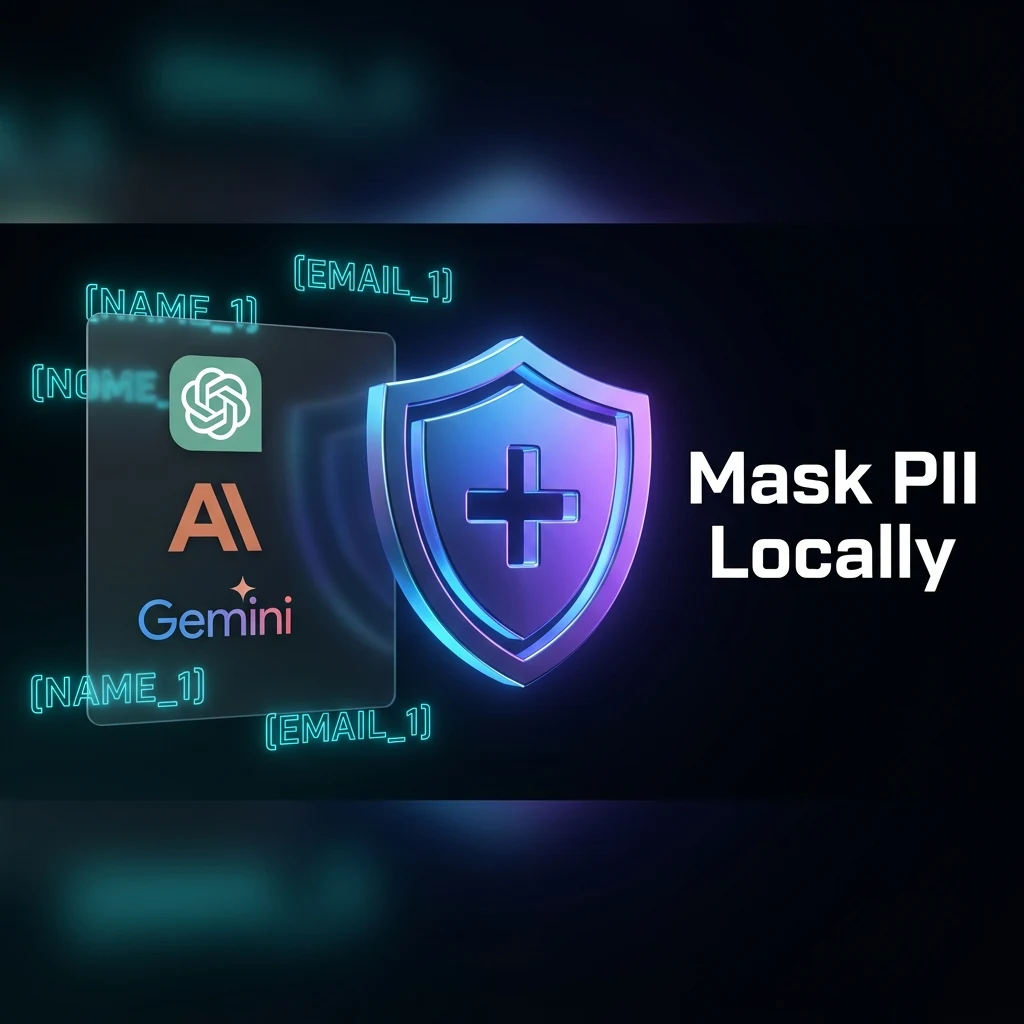
Safe Copy Ready Prompt Copied! [NAME_1], [EMAIL_1] securely tokenized in local RAM.
"We run this before every ChatGPT session. Our InfoSec team was satisfied in one audit."
— Marcus T., Lead Compliance Engineer · European Fintech (400 employees)
"Finally — a PII tool that doesn't route my data through someone else's cloud."
— Jordan K., Senior DevOps Engineer · US Healthcare SaaS
"Used this to pass our SOC 2 AI-prompt review. The offline verification is the proof point."
— Priya N., Head of Legal Ops · Series B SaaS, 200 seats
Zero-Egress Security Proof100% Client RAM
Verify mathematical zero network transmission in Chrome DevTools or Airplane Mode
The Zero-Trust Invariant (ZTDS)0 Outbound Calls
PrivacyScrubber does not rely on vendor promises or backend data encryption. All parsing, entity recognition, regex evaluation, and surrogate token mapping execute 100% inside your browser volatile memory.
Auditor Verification Steps (F12)
1
Open Browser DevToolsPress F12 or Cmd+Option+I and select the Network tab. Check Disable cache.
2
Simulate Air-Gap / Airplane Mode (Optional)In the DevTools Network tab, switch the throttling dropdown from No throttling to Offline, or toggle device Airplane Mode.
3
Execute Sanitization & Confirm 0 RequestsPaste text containing sensitive data into PrivacyScrubber and click Scrub in RAM. Exactly 0 HTTP, WebSocket, or beacon calls are dispatched.
Zero Data Egress Guaranteed by Client-Side Architecture
Regulatory Blueprints & Document Workflows
Sanitize High-Liability Documents Before Submitting to Enterprise AI Models
Eliminate PII, PHI, financial ledgers, and trade secrets in local RAM. Select your document type below for verified field-by-field redaction matrices and safe AI prompts.
GLBA • PCI DSS
Finance, Underwriting & Banking
Prevent customer account numbers, SWIFT MT103 instructions, and payroll records from leaking into training corpora.
Protect internal API keys, database dumps, and cloud infrastructure secrets from entering LLM context windows in Cursor, Windsurf, Claude Code, and Copilot.
Zero-Metadata Engine Breakdown: What PrivacyScrubber Strips Beyond Visible Text
Visual redaction alone leaves organizations exposed to court subpoenas and LLM data extraction. Real enterprise documents store deep internal XML structures, revision histories, and hidden text layers that cloud AI parsers automatically ingest.
.DOCX • .XLSX
OpenXML Package Dissection
Word and Excel files are ZIP archives storing internal XML trees. Naive text deletion leaves metadata intact.
docProps/core.xml & app.xml
Stripped: Author usernames, company name, revision count, total editing minutes, template lineage.
word/comments.xml & w:del
Stripped: Uncommitted track changes, reviewer feedback, and deleted text passages.
Which Side of AI Security Are You On? Paper Promises vs Physical Data Sovereignty
Not your RAM, not your data. The fundamental divide between signing legal contracts to allocate post-breach liability versus enforcing mathematical zero-egress before generative models ever see raw text.
Model A • Legacy Cloud Security
Paper Compliance
Post-Breach Liability
Organizations rely on Data Processing Agreements (DPAs), Business Associate Agreements (BAAs), and trust declarations from cloud proxy vendors (Skyflow, Presidio Cloud, AWS Comprehend).
Continuous Third-Party Egress
Unredacted prompt text, client IDs, and financial records transit across external fiber cables to intermediary vendor cloud servers.
Residual Cloud Custody & Subpoena Risk
Ephemeral cloud caches, server crash logs, and worker heaps remain vulnerable to insider threats, infrastructure compromises, and CLOUD Act warrants.
Procurement Drag (6–8 Weeks)
Requires exhaustive InfoSec supplier questionnaires, subprocessor chain audits, and legal review of third-party indemnification caps.
Reactive Financial Exposure
When a cloud subprocessor leaks, the DPA only defines who pays the lawyers. Average IBM Cost of a Data Breach: $4.88M.
Operational Stance: Trust Promises • Sue Post-Breach
Raw text never hits the network adapter. All tokenization, Luhn checks, and redactions complete inside browser V8 RAM in <2ms.
Mathematical Immunity to Subpoena & Leaks
No cloud server holds your cleartext session map. It is mathematically impossible to breach, leak, or subpoena data that was never transmitted.
0-Day Procurement (DPA Legally Waived)
PrivacyScrubber is not a Data Processor under GDPR Art. 4(8) or HIPAA. InfoSec and Legal grant immediate clearance without 6-week vendor delays.
Empirical Verification (Airplane Mode)
Fully functional with Wi-Fi disabled. Inspect Chrome DevTools Network tab: exactly 0 requests and 0 bytes transferred.
Deep Zero-Metadata Office Sanitization
Beyond visible text, our in-RAM engine purges hidden XML properties (docProps/core.xml, wb.Props), wiping authors, corporate tags, and revision history in DOCX and XLSX before download.
The 2026 Irreversibility Trap • EU AI Act Article 10
Why Data Deletion from Frontier LLMs is Impossible
Once sensitive data enters an AI model or enterprise RAG vector store, it cannot be selectively deleted—machine unlearning remains unsolved. Network gateway DLPs miss encrypted WebSockets and streaming SSE tokens. PrivacyScrubber enforces source-level sanitization in local RAM before transmission, satisfying EU AI Act governance and DORA resilience mandates.
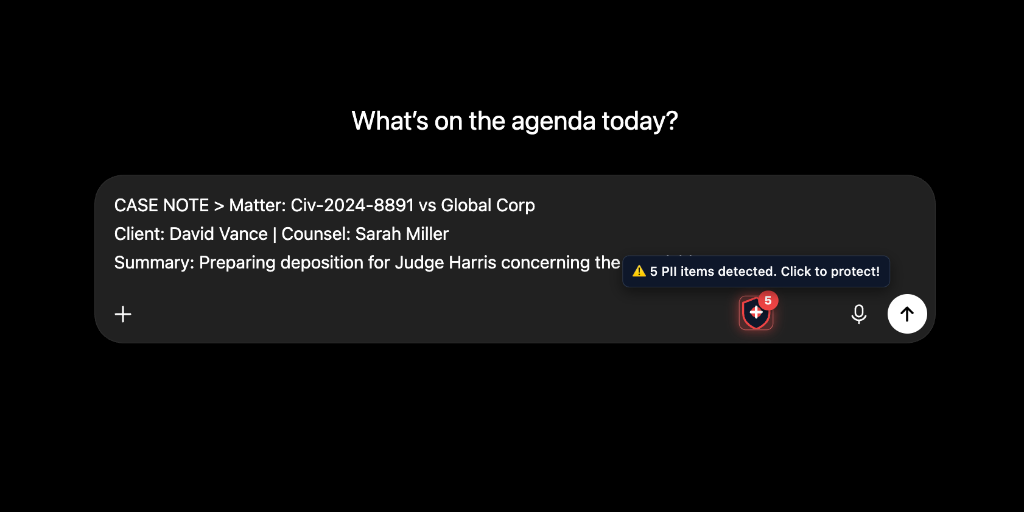
Sanitize AI Prompts Before They Leave Your Browser In-Page Real-Time Protection on ChatGPT, Claude & Gemini
Automatically detect and tokenize customer names, API keys, medical notes, and financial data directly inside your AI chat window. 0ms network latency — 100% local browser RAM processing.
Desktop AI Shield
★ 5.0 CWS
Zero-exfiltration prompt sanitization directly in your AI chat window
Intercepts names, emails, cards, and keys in local RAM before prompt transmission to LLMs. Zero server logs.
In-Page Prompt Sanitizer for ChatGPT, Claude & Gemini
Air-gapped client-side interception inside your AI text inputs. Customer identities, credentials, medical notes, and financial records are sanitized in local RAM before prompt transmission.
In-Page Auto-Detection (9 LLMs)
Native injectors for ChatGPT, Claude, Gemini, Copilot, DeepSeek, Perplexity, Poe, HuggingFace, and Mistral.
1-Click Reverse Reveal in Chat
Instantly swaps tokens in the AI response back to original names and data directly in your browser.
100% Offline RAM & ZTDS Receipts
30 industry profiles (HIPAA, GDPR), custom regex rules, and cryptographic audit receipts with zero server telemetry.
In-Process Interception: APIs, DB Dumps & RAG Vector Lakes
Developers and AI agents pipe crash dumps and customer records into LLMs, leaking AWS credentials, JWTs, and consumer PII. The Developer SDK and MCP Server act as an autonomous consumer privacy fiduciary—intercepting sensitive entities at the application boundary in <1ms local RAM before transmission, vector indexing, or logging.
devops_crash_log.log
// Raw text pasted into Cursor/ChatGPT Error connecting to DB: postgres://admin:superSecretPass2026@prod-db.internal:5432/customers AWS_KEY: AKIA4X9M2PLRT887NNZZ
// Tokenized in client RAM with Zero Network Transmission Error connecting to DB: postgres://admin:[PASSWORD_1]@prod-db.internal:5432/customers AWS_KEY: [API_KEY_1]
// 1-Click Reveal rehydrates original DB credentials on your machine LLM Solution: Fix connection pooling for postgres://admin:superSecretPass2026@...
"Security analysts tokenize IP addresses, credentials, and hostnames from incident logs locally before running AI root-cause analysis — zero data exposure to cloud APIs."— OSCP Security Analyst • Cloud Infrastructure Team
Risk: PCI-DSS v4.0 & GLBAPenalties: Up to $100k/moTarget: Extension & Web
Zero-Server Sanitization for PAN, IBAN & Wire Transfers
Financial analysts modeling client portfolios or summarizing bank statements risk exposing primary account numbers (PAN) and SWIFT codes. PrivacyScrubber uses Luhn-verified sanitization locally in RAM before transmission.
wire_instruction.txt
// Sensitive wire transfer pasted for LLM review Wire $450,000.00 to Robert Chen (Acct: 4532-0151-8879-2241, IBAN: US948123490019283, SSN: 203-44-8821).
// Luhn-verified PAN sanitization with contextual token consistency Wire [FINANCIAL_1] to [NAME_1] (Acct: [CARD_1], IBAN: [IBAN_1], SSN: [SSN_1]).
// AI generates audit memo → Reveal rehydrates real numbers locally LLM Audit Report: Verified authorization for Robert Chen ($450,000.00) with Goldman Sachs.
"GRC teams sanitize financial reports and operational files offline before AI-powered audit prep — no vendor database storage, no scope extension for external auditors."— Fintech GRC Team • SOC 2 & ISO 27001 Readiness
Physicians and clinicians summarize EHR records and patient histories without waiting months for signed BAA agreements. PrivacyScrubber implements the HIPAA Safe Harbor standard 100% in local browser RAM.
clinical_chart_ehr.txt
// Unredacted clinical chart Patient: Sarah Jenkins (DOB: 1984-05-12, SSN: 042-88-9124). Admitted for acute bronchitis. Primary: Dr. Gregory House. Policy #BC-99214.
// AI generates diagnostic plan → Reveal rehydrates patient identity locally Clinical Care Summary: Recommended antibiotic dosage plan for Sarah Jenkins under care of Dr. Gregory House.
"Clinical teams strip all 18 HIPAA Safe Harbor identifiers from patient notes in browser RAM before using AI summarization — transforms PHI into Safe Harbor de-identified tokens in local browser RAM before transmission."— Clinical Informatics • PHI De-Identification
Preserve Privilege in M&A Agreements & Depositions
Pasting unredacted deposition transcripts or merger terms into public AI models waives attorney-client privilege. PrivacyScrubber tokenizes litigation entities and provides 1-click reversible de-anonymization.
deposition_merger_v1.docx
// Confidential deposition file Privileged Deposition: Case #2026-CV-88912 (Smith v. Cyberdyne Corp). Deposition of Client Jennifer Sterling regarding escrow of $3,400,000 at JPMorgan Chase.
// Fully tokenized entity mapping before AI submission Privileged Deposition: Case [CASE_1] ([PLAINTIFF_1] v. [CORP_1]). Deposition of Client [CLIENT_1] regarding escrow of [FINANCIAL_1] at [BANK_1].
// 1-Click Reverse Scrub rehydrates names in the generated brief Drafted Settlement Clause: Escrow indemnity terms finalized for Jennifer Sterling in #2026-CV-88912.
"Law firms redact client names, case numbers, and privileged communications from prompts before sending to ChatGPT — verified by zero outbound packets in the browser Network tab."— Senior Partner • Attorney-Client Privilege Preservation
HR practitioners analyzing payroll compensation or screening resumes risk leaking salaries and introducing gender/racial bias into AI models. Bulk offline file processing strips identifiers before AI analysis.
candidate_screening.csv
// Candidate resume and compensation history Candidate: Emily Watson (Email: emily.w@enterprise-tech.io, Salary: $165,000/yr, SSN: 019-48-2910).
"HR teams batch-anonymize resumes and compensation tables in local memory before feeding to LLMs for skill evaluation — eliminating unconscious gender/ethnic bias and protecting employee GDPR rights."— Head of People Ops • Enterprise Talent Acquisition
Two-Tier Fleet Governance: Central CISO Lock + Local Flexibility
Employees will use generative AI regardless of corporate bans. PrivacyScrubber solves the Shadow AI paradox through a two-tier architecture: Central security officers enforce mandatory regex rules, while employees retain local agility.
Tier 1: Central CISO Hard Lock
Deploy non-negotiable MDM regex rules via Chrome Enterprise. Mandates zero-tolerance blocking for PAN, SSN, API secrets, and proprietary project codes across 10,000+ browser seats.
Tier 2: Local Worker Agility
Engineers and analysts create ad-hoc local sanitization rules for active client projects on the fly, eliminating IT friction and helpdesk change tickets.
Encrypted Handoff via XChaCha20-Poly1305 + Argon2id
Zero-Knowledge Guarantee
"VP InfoSec teams deploy locked Team Blueprints that enforce identical sanitization profiles across 500+ employees — preventing shadow AI data leaks organization-wide."— VP InfoSec & CISO • Enterprise AI Governance
Verify Zero Data Transmission in 60s & Comply with GDPR, HIPAA, SOC 2 & EU AI Act
No auditor or vendor trust needed. Open DevTools to prove PrivacyScrubber sends zero network requests with your data — backed by turnkey statutory compliance for enterprise LLM deployments.
60-Second Proof of Zero Transmission
Independent DevTools verification protocol for InfoSec & SecOps
Airplane Mode Verified
1
Open DevTools
Press F12 or right-click → Inspect
2
Network Tab → Clear
Click the Clear icon to reset active request log
3
Airplane Mode (opt)
Cut Wi-Fi — engine runs 100% offline
4
Paste → Protect
Watch Network tab as text is tokenized
5
Audit Result: 0 Network Requests with PIIVerified
Zero bytes egressed to external endpoints — full mathematical guarantee of zero data leakage.
Network:0 requests|0 B transferred
Architectural Objection Defense
6 Tough Questions Security Architects Ask Us
Direct technical answers addressing the core questions evaluated by CISOs, security researchers, and enterprise review committees.
01Why not Presidio or cloud NER models?
Cloud NER sends raw text to remote servers, violating Zero-Trust before masking occurs. ZTDS executes deterministic lookaround regexes locally in RAM (<1ms) with zero cloud leaks.
Deterministic RAM Engine · 0ms Network Hops
02How is browser memory protected from extraction?
PrivacyScrubber operates under strict CSP (script-src 'self') with zero external scripts. The volatile sessionMap is strictly tab-isolated, never stored on disk or cookies, and wiped on tab close.
Volatile V8 Heap · Zero Persistence
03What happens if generative AI alters synthetic tokens?
Our patent-pending engine uses Tolerant Fuzzy Unscrubbing to handle model case changes, whitespace shifts, and markdown styling. Omitted tokens are flagged in the local audit log without corrupting text.
Algorithmic Fuzzy Reveal · U.S. & Int'l Patents Pending
04How does InfoSec audit compliance without central servers?
PrivacyScrubber generates cryptographically verifiable CISO receipts (SHA-256 hash, entity count) directly on-device. Enterprise teams stream zero-PII telemetry locally to internal SIEMs (Splunk, Datadog) via our Node.js SDK and MCP.
Local SHA-256 Proof · Zero-PII SIEM Webhooks
05Why use ZTDS if our enterprise signed an Azure OpenAI or ChatGPT Enterprise BAA?
Enterprise BAAs and DPAs establish who pays the lawyers and regulatory fines after an incident, but they cannot prevent raw customer IDs, trade secrets, and API keys from landing in cloud provider crash logs or being reached via CLOUD Act subpoenas. A paper contract protects legal counsel during discovery; physical ZTDS ensures the data was never transmitted in the first place.
Physical Immunity vs Paper Contracts • Not Your RAM, Not Your Data
06What if our documents contain rare or proprietary PII?
Beyond 30 pre-built industry profiles, users and admins can define custom client-side regular expressions or import MDM-locked company dictionaries that execute 100% locally in device memory.
Paper Contracts vs Physical Immunity: Local RAM vs Cloud DLP
Sign a DPA to allocate liability after an incident, or isolate memory so a breach is physically impossible. Why enterprise security architects choose in-memory client-side ZTDS over cloud DLP proxies.
Cloud DLP Proxies & Gateways
High Overhead
Network Egress: Transmits unredacted prompt payloads over the internet to intermediate cloud proxy servers.
High Latency: 250ms – 600ms latency penalty per AI query due to multi-tenant cloud roundtrips.
Sanitize enterprise prompts locally in browser RAM before sending to ChatGPT, Claude, Gemini, or Cursor. Zero servers, zero per-seat tax, 100% GDPR, HIPAA & SOC 2 compliant.
Flat-rate team protection with 100% in-memory client-side sanitization.
0-Day Approval: Zero subprocessors, no DPA paperwork needed.
<2ms local RAM execution with 0 bytes network egress.
Turnkey compliance proofs: SOC 2 Type II & ISO 27001 mapping.
Verdict: Pure Mathematical Asymmetry
Zero-Database Architecture
How PrivacyScrubber Licensing Actually Works
We refuse to store your passwords or track your identity in a central database. Privacy is an engineering guarantee, not a marketing promise.
1. Zero Accounts & No Passwords
You never create an account, set a password, or trust us with login credentials. There is no cloud user database to be breached, scraped, or subpoenaed.
0 Credentials Stored • 100% Anonymous
2. Offline Cryptographic Keys
Paid tiers (PRO, TEAMS, SDK) activate via an offline cryptographic license key. Validation occurs mathematically in your local RAM without cloud telemetry or pingbacks.
Airplane Mode Verified • Zero Pingbacks
3. 1-Year G2 Reviewer Pass
Solo practitioners and engineers can claim a full 1-year PRO license key ($180 value) 100% free by publishing an honest, verified practitioner review on G2.
Procurement & CISO Total Cost of Ownership (TCO)
Traditional Cloud DLP vs. PrivacyScrubber TEAMS — 94% Cost Reduction
Cloud DLP vendors charge $30–$50/user/mo ($18,000–$30,000/yr for 50 seats), introduce 250ms+ network latency, and require months of vendor security assessments. PrivacyScrubber TEAMS costs $99/mo flat ($1,188/yr) for unlimited seats with zero server-side subprocessor liability.
In-process consumer privacy fiduciary (@privacyscrubber/sdk) embedded into Node.js / WASM. Pre-emptively intercepts PII at the application boundary with zero data loss, zero third-party DLP proxies, and <1ms execution before vector indexing or LLM egress.
Backend Developers, AI Engineers, RAG Architects
Free (Quota) / $299 Prod
License Custody & Kill Switch
Zero-server key custody with instant emergency revocation (KRL) if a key is leaked. Master Admin Key isolation for teams.
Everything you need to know about browser-based PII redaction, compliance scope, and AI safety.
Verified architecture & compliance answers
Features & FilesHow does the Zero-Trust Agentic Guard work in practice when AI agents run shell commands or edit code?
PrivacyScrubber Agentic Guard acts as a local in-memory proxy between your workstation and autonomous AI coding agents (Cursor, Windsurf, Claude Code, Copilot). When an agent executes shell commands (guard_exec) or reads credentials (guard_read_file), output is intercepted in local RAM and secrets are replaced with anonymous tokens ([API_KEY_1], [EMAIL_1]). The remote LLM reasons exclusively over tokenized placeholders. When applying code changes (guard_apply_patch), tokens are reversed back to authentic local secrets in memory and written to disk with an automatic .bak backup. Zero secrets leave your device.
Security & ZTDSDoes PrivacyScrubber send my data to any server?
No. Every detection and sanitization operation runs locally inside your browser's RAM. Zero bytes of your text, documents, or session tokens leave your device. Verify this yourself: open DevTools → Network tab, test our DLP speed benchmark, or disconnect from the internet entirely — our air-gapped local processing keeps working offline.
Security & ZTDSDoes dropping or uploading a transcript or document into PrivacyScrubber transmit my file to a server?
No. When you drop or upload a document (.txt, .docx, .pdf, or client meeting transcript) into PrivacyScrubber, the file never travels across the internet. The entire webpage operates like a self-contained local application inside your browser: file parsing, text extraction, and PII redaction execute exclusively in your computer's local RAM. You can verify this complete data isolation by turning your computer's Wi-Fi completely off (Airplane Mode) before dropping your file — the tool continues to sanitize your documents with 100% functionality and zero network connectivity.
Features & FilesWhich AI platforms does the browser extension support?
The PrivacyScrubber Chrome extension injects real-time PII sanitization directly inside ChatGPT, Claude, Gemini, Microsoft Copilot (Bing Chat), Grok, Perplexity, DeepSeek, Qwen, Kimi, and Zendesk. For coding agents and autonomous workflows, explore our AI Agents Protection guide, or use the web app at privacyscrubber.com to sanitize text before pasting it into any interface.
Pricing & TeamsWhat does the free version include?
The free Community Tier includes universal consumer PII masking (Names, Phones, Emails, National IDs, Credit Cards, IPs, URLs) with 15,000 characters per scrub, a 5,000-character free quota across all 30 specialized industry profiles, single-file upload (.txt, .docx), and PDF extraction up to 3 pages. It also includes free access to the Developer SDK (@privacyscrubber/sdk) and IDE MCP Server (@privacyscrubber/mcp-server) with built-in session quotas — zero credit card, zero passwords, and zero accounts required. For solo practitioners and developers, you can also claim a 1-Year PRO Reviewer Pass ($180 value) 100% free with an honest review on G2.
Features & FilesDo I need to create an account or provide a password?
No. PrivacyScrubber is architected with Zero Accounts and Zero Passwords. We do not maintain a central user database or store login credentials. Upgrades (PRO, TEAMS, Developer SDK) are activated purely via an offline cryptographic license key entered into your browser or local SDK environment. Validation executes mathematically in volatile device RAM with zero phone-home user tracking.
Features & FilesCan PrivacyScrubber sanitize W-2 forms, paystubs, and payroll documents?
Yes. Our specialized financial PII profile natively detects Employer Identification Numbers (EIN/FEIN), payroll-format names (LASTNAME, FIRSTNAME), corporate employer names with legal suffixes (Inc, LLC, Corp), and US street addresses. All wage amounts, tax withholdings, hourly rates, and financial figures are preserved untouched — essential for loan underwriting and HR payroll compliance.
Features & FilesCan I get my original data back after the AI responds?
Yes. Paste the AI's response back into the tool and click Reveal. The 1-Click Reveal engine swaps every token ([NAME_1], [EMAIL_2], etc.) back to the original value using your volatile local session map — zero server round-trips, zero database storage.
Compliance & LegalDoes this help with HIPAA, GDPR, or SOC 2 compliance?
PrivacyScrubber is designed to support de-identification under HIPAA Safe Harbor (45 CFR §164.514) for 18 PHI identifiers, GDPR Article 25/32 data minimization, and SOC 2 Type II controls by stripping identifiers in browser RAM before prompt submission. Review our Top 20 Corporate PII Guide and CISO AI Security Blueprint for detailed governance controls.
Compliance & LegalWhat is the CISO Procurement Memo and how do enterprise teams use it?
The CISO Procurement Memo is a standardized, copy-ready compliance document for enterprise IT, security architects, and procurement officers. It provides General Counsel, DPOs, and InfoSec committees with formal statutory evidence (GDPR Art. 4(8)/28, HIPAA 45 CFR § 164.502(e), CCPA § 1798.140) proving that because PrivacyScrubber runs 100% in local client RAM with 0 bytes transmitted to any server, third-party DPA/BAA contracts and lengthy vendor risk questionnaires (SIG/CAIQ) are legally non-applicable, enabling fast-track 0-day software approval.
Security & ZTDSHow does PrivacyScrubber prove zero network egress and lightweight memory usage?
Every software build undergoes an automated 13-suite security and performance QA pipeline in continuous integration (CI). Automated headless network sniffers verify that during PII sanitization, exactly 0 HTTP, WebSocket, or background telemetry packets leave the browser. In-memory heap profiling enforces an ultra-lightweight ceiling under 6MB RAM (5.68 MB JS Heap) and sub-75ms streaming DOM mutation scans across 5,000 live nodes, ensuring zero laptop heating and zero CPU throttle. Review the full audit in our Technical Security Specifications.
Security & ZTDSWhat happens to the session map when I close the tab?
The session map exists exclusively in volatile browser RAM and is strictly isolated per tab. The moment you close the tab, reload the page, or navigate away, the entire mapping — including all original PII values and cryptographic keys — is permanently purged from memory. Read more in our Technical Security Architecture.
Features & FilesWhat is the difference between AI Tokens mode and Blackout mode in PrivacyScrubber?
AI Tokens mode replaces sensitive entities with structured badges like [NAME_1] and [EMAIL_1], preserving contextual roles for LLMs (ChatGPT, Claude) and allowing 1-click restoration via Reveal Originals. Blackout mode applies permanent, solid black raster bars over sensitive pixel coordinates, physically destroying vector text layers for court filings, legal discovery, and FOIA releases with zero underlying text leakage.
Features & FilesWhy do standard PDF blackout tools leak data, and how does PrivacyScrubber prevent it?
Most conventional PDF editors and markup tools merely overlay black rectangles as a visual layer, leaving underlying OCR text, character coordinates, and metadata intact and extractable via Cmd+A copy or pdftotext. PrivacyScrubber executes true Secure Raster Flattening: pages are re-rendered in local RAM, PII coordinates are overwritten at the pixel level, and a fresh PDF is synthesized with zero underlying text layers, guaranteeing 100% leak-proof redactions.
Features & FilesWhat file formats can I sanitize, and what do I get back?
Supported formats include .txt, .docx, .pdf (text-layer and scanned images via Tesseract OCR), .xlsx, and .csv. With Batch File Redaction and Excel Spreadsheet Scrub, you can download sanitized files with PII removed or export redacted PDFs with permanent raster flattening (zero underlying text layers).
Features & FilesDoes PrivacyScrubber sanitize hidden document metadata (author, company name, revision history) in Word (DOCX) and Excel (XLSX) files?
Yes. Most conventional redaction tools only mask visible text or cell contents, leaving hidden document properties intact. Microsoft Word (.docx) and Excel (.xlsx) files are compressed XML archives that store author identity (<dc:creator>), modifying users (<cp:lastModifiedBy>), corporate affiliation (<Company>), and revision timestamps inside docProps/core.xml, docProps/app.xml, and workbook properties. PrivacyScrubber's in-RAM sanitizer intercepts these archives in local browser memory, wipes original author and organization tags, eliminates custom metadata, and overwrites properties with anonymous synthetic signatures (PrivacyScrubber (Zero-Trust)) before export. Your exported files are completely clean both visibly and metadata-wise, with zero network transmission.
Features & FilesWhy does the Chrome extension convert uploaded files (PDF/DOCX) into .txt, and how do file upload quotas work?
When users upload or drop documents (such as resumes or legal agreements) into ChatGPT or Claude, PrivacyScrubber intercepts the file in local browser RAM. Binary formats (.pdf, .docx) contain hidden metadata, revision histories, and XML streams that can expose personal identity even if visible text is edited. PrivacyScrubber extracts document text in memory, replaces sensitive PII with tokens, strips names from the filename, and injects a clean synthetic .txt file into the AI prompt window. This eliminates 100% of binary metadata leakage while preserving full LLM analytical utility. The Free tier includes a daily allowance of 3 document uploads per 24 hours (and up to 15,000 characters per scrub), while PRO and TEAMS provide unlimited document processing.
Security & ZTDSWhat is AI DLP and how does client-side browser sanitization differ from a legacy cloud proxy?
AI Data Loss Prevention (AI DLP) refers to specialized security controls engineered to inspect and sanitize unstructured conversational prompts, streaming tokens, and file uploads before ingestion by generative AI models. Traditional gateway DLPs (like Zscaler, Netskope, or Cloudflare proxies) sit downstream in the network and struggle with encrypted WebSockets, streaming Server-Sent Events (SSE), and conversational context—often causing latency or failing to de-identify data before transit. PrivacyScrubber executes AI DLP directly at the source: inside local browser RAM (<2ms latency). Sensitive entities are converted into contextual tokens ([NAME_1], [ACCOUNT_1]) before packets ever reach the network adapter, guaranteeing zero vendor data custody and mathematical immunity to cloud leaks.
Security & ZTDSWhat is the AI data irreversibility problem and why must PII redaction happen at the client endpoint?
The AI Irreversibility Problem stems from the mathematical impossibility of selectively 'unlearning' or excising data once it has been digested into large language model neural weights or stored in multi-tenant RAG (Retrieval-Augmented Generation) vector databases. Machine unlearning remains an unsolved scientific challenge; post-hoc deletion requests (such as GDPR Article 17 'Right to be Forgotten') cannot be reliably enforced against fine-tuned weights or vector embeddings. Consequently, regulatory bodies (under the EU AI Act Article 10 and HIPAA Safe Harbor) require data sanitization to occur strictly prior to ingestion. PrivacyScrubber's endpoint-only RAM architecture guarantees that sensitive identifiers never enter LLM training corpora or remote vector caches.
Pricing & TeamsHow does TEAMS encrypted session handoff work?
PrivacyScrubber TEAMS uses Argon2id key derivation and XChaCha20-Poly1305 authenticated encryption (via libsodium WASM). Through encrypted team session handoff, colleague Alice sanitizes prompts and shares a cryptographic blueprint; colleague Bob reveals original values locally with zero server intermediary.
Security & ZTDSHow does Shadow DOM sandboxing protect against malicious scripts?
PrivacyScrubber wraps editor inputs and tokenized outputs inside closed Shadow DOM roots. This makes unredacted sensitive text completely inaccessible to DOM-scraping scripts, third-party analytics, or unauthorized browser extensions running on the host page. Learn more about our in-DOM prompt sandbox.
Features & FilesCan I use PrivacyScrubber as an MCP server in Cursor, Windsurf, or Claude Desktop?
Yes. The official @privacyscrubber/mcp-server package runs as a local stdio-based Model Context Protocol server for Cursor, Windsurf, Claude Desktop, and VS Code. It intercepts codebase prompts, sanitizes database passwords and API tokens in RAM, and protects your software development workflows with zero external calls.
Pricing & TeamsIs there a developer SDK for integrating PII sanitization, and is it free to try?
Yes. The @privacyscrubber/sdk NPM package exposes the headless sanitization engine as a programmatic Node.js & ESM library. It is 100% free to test locally in under 30 seconds with a permanent free quota (15k characters General / 5k characters Specialized per session)—no credit card, no account sign-up, and zero expiring trials. Call scrubText() and unscrubText() directly in local dev environments, CI/CD gates, and RAG pipelines. Commercial licensing ($299/mo or $2,990/yr) is only required for unlimited production nodes and continuous high-throughput backend services.
Features & FilesHow do developers integrate @privacyscrubber/sdk out of the box, and what are the operational capabilities and state risks?
Developers integrate @privacyscrubber/sdk with zero dependencies using a 1-line wrapper like wrapOpenAI(new OpenAI()), or via standalone sanitize() and restore() in <1ms local RAM latency. It intercepts outbound prompts before network transmission, tokenizes PII and infrastructure secrets into semantic placeholders ([NAME_1], [AWS_KEY_1]), and rehydrates LLM responses locally—including streaming SSE tokens via sliding window reconstruction. Operation is completely plug-and-play with zero background servers or Python/spaCy daemons. The primary operational risk to manage is state custody in distributed microservices: tokenMap is volatile and RAM-only, requiring stateless microservices to preserve or pass the token map between pre-processing and post-processing nodes.
Features & FilesDoes changing the detection profile reset my session?
No. Switching between our 30 specialized industry detection profiles (e.g. from General to Legal & Contracts or Medical) preserves active tokens and session maps. Tokens remain restorable via Reveal until you click the Clear button explicitly.
Security & ZTDSHow does PrivacyScrubber prevent data residue in system RAM?
After processing documents (PDF, DOCX, XLSX), the engine immediately overwrites all temporary ArrayBuffers at the byte level with zeroes (Uint8Array.fill(0)) before releasing them to garbage collection. Pair this with our tamper-evident audit receipts for verifiable forensic compliance.
Pricing & TeamsCan enterprise or accounting teams pay via invoice or wire transfer?
Yes. For organizations requiring formal vendor onboarding, purchase orders (PO), or SWIFT/SEPA bank wire transfers, we provide custom invoicing with EU VAT reverse-charge support. Check our transparent pricing matrix or visit our Enterprise Solutions Hub.
Security & ZTDSDoes PrivacyScrubber load any third-party analytics or tracking scripts?
No. The platform loads zero analytics trackers, third-party cookies, or fingerprinting scripts. Maintaining strict Content Security Policies (CSP) ensures third-party endpoints cannot inspect memory or DOM states. Review our full commitments in our Zero-Server Privacy Policy.
Compliance & LegalHow are TEAMS admin roles managed without a backend?
There are no centralized accounts. Team administrators configure mandatory regex rules and compliance profiles locally in the Teams Deployment Hub, then generate a cryptographically signed Blueprint URL. When team members open this link, the configuration locks client-side without any backend database.
Compliance & LegalWhat rights does a Team Administrator have compared to Managed Team Members in TEAMS?
The purchaser acts as the Team Administrator with exclusive authority to configure organization-wide custom Regex rules, corporate token taxonomy (e.g. [PATIENT_ID]), and default compliance profiles in the Teams Dashboard. When the Admin exports a cryptographically signed Blueprint with Lock Rules enabled, Managed Team Members receive a locked, read-only configuration across their Web App and Chrome Extension (badged as [ENTERPRISE]), preventing employees from altering or bypassing corporate DLP policies.
Features & FilesWhat is the difference between Custom Regex Rules and Token Labels?
Our Custom Regex Rules Engine discovers proprietary data formats (custom ticket IDs, project codes like PROJ-1234, internal server URLs). Token Labels, in contrast, customize the replacement placeholder (e.g. renaming [NAME] to [PATIENT_ID]) to give LLMs optimal domain context without modifying regex patterns.
Security & ZTDSHow does PrivacyScrubber detect PII without AI hallucinations or latency?
PrivacyScrubber utilizes a high-performance deterministic pattern matching engine running natively in browser RAM (sub-2ms execution time). Unlike cloud LLM-based redaction which can hallucinate, omit tokens, or introduce network latency, our deterministic parser guarantees 100% reproducible tokenization across 18 core Safe Harbor/GDPR entity types (names, emails, phones, SSNs, credit cards, IBANs, medical MRNs, API tokens). PRO users can also inject custom regex rules or run local offline OCR for documents.
Pricing & TeamsHow does license key custody, non-transferability, and emergency revocation work without user tracking?
Because PrivacyScrubber maintains a Zero-Trust Data Sanitization (ZTDS) architecture with zero server databases and zero phone-home user tracking, license custody is sovereign to the purchaser. All license tiers are strictly non-transferable. If a key is accidentally leaked or exposed, the billing owner can immediately request emergency revocation via support@privacyscrubber.com. We append the SHA-256 hash of the compromised key to our global Key Revocation List (KRL), instantly invalidating it across all client instances within 24 hours while reissuing a secure replacement.
Pricing & TeamsWhat are the exact operational boundaries between Personal PRO, Team Workspace, and Developer SDK licenses?
PRO ($15/mo or $110 Lifetime) is a single-user personal license valid on up to 3 personal devices (Web, Chrome, IDE MCP). TEAMS ($99/mo flat) is an organization-wide internal workspace covering unlimited internal staff with Master Key Isolation. The Developer SDK ($299/mo or $2,990/yr) covers headless execution across unlimited internal backend nodes, microservices, ETL pipelines, and internal RAG vector databases. Embedding into customer-facing commercial SaaS for third-party resale requires an OEM/Enterprise contract.
Security & ZTDSIs the PrivacyScrubber MCP Server completely air-gapped, and is it free to use?
Yes. The @privacyscrubber/mcp-server package executes strictly in local machine memory over standard stdio JSON-RPC transport with zero outbound network requests, zero telemetry, and 100% volatile RAM mapping. It is 100% free to use with built-in session quota directly in Cursor, Windsurf, Claude Code, and VS Code without requiring a credit card or account registration. PRO and TEAMS tiers provide unlimited character volume and enterprise policy synchronization.
Features & FilesHow can solo coaches, therapists, and executive consultants sanitize client meeting transcripts (Zoom, Teams, Google Meet) without cloud exposure?
Solo practitioners handling confidential client sessions (ADHD coaching, therapy, executive consulting) can execute a 100% offline, zero-cloud workflow: First, transcribe your locally recorded Zoom or Teams meeting on your own device using an offline Speech-to-Text engine (such as MacWhisper or Whisper.cpp running natively on Apple Silicon / local GPU). Second, drop the resulting .txt or .docx transcript into PrivacyScrubber at privacyscrubber.com (even with your device Wi-Fi completely turned off). PrivacyScrubber strips client names, sensitive disclosures, neurodiversity/medical conditions, and identifying details into safe tokens ([NAME_1], [ORGANIZATION_1]) in volatile RAM. Third, submit the sanitized transcript to Claude or ChatGPT to extract themes, check coaching quality, or draft session summaries. Finally, click Reveal in PrivacyScrubber to rehydrate original client names locally. Zero client personal data ever touches third-party servers.
Features & FilesHow does PrivacyScrubber handle European names with initials and national identity numbers like Dutch BSN, German Steuer-ID, or French NIR?
PrivacyScrubber features dedicated pattern recognition engines for European business and civil nomenclature. Our punctuation-aware lookahead models accurately tokenize initial-prefixed names with noble particles (e.g., 'J. de Ruiter', 'K. van den Berg', 'M. de Jong') without prematurely splitting or dropping initials. For statutory identity tokens, PrivacyScrubber embeds native checksum and format validators in client-side RAM for European national IDs—including the Dutch 11-test checksum for BSN/SOFI numbers, 11-digit German Steuer-ID, 16-character Italian Codice Fiscale, Spanish DNI/NIE, French NIR/INSEE, and Dutch KvK commercial register numbers.
Compliance & LegalHow does PrivacyScrubber protect enterprise RAG vector databases and prevent GDPR Article 17 re-indexing costs?
Embedding raw personal data into vector databases (Pinecone, Qdrant, Weaviate, Milvus) creates permanent regulatory liability: fulfilling a single GDPR Article 17 'Right to Erasure' request requires locating all high-dimensional embeddings containing that person's data and recalculating vector indexes—costing upwards of $14,000 per deletion cycle. By embedding the headless @privacyscrubber/sdk into your ingestion pipeline, raw PII is swapped with deterministic cryptographic tokens in Node.js heap (<0.065ms) before vector embedding. When a deletion request arrives, organizations simply purge the local key mapping, achieving instantaneous O(1) mathematical erasure at $0 infrastructure cost.
Compliance & LegalWhy does PrivacyScrubber NOT require a Data Processing Agreement (DPA) or Business Associate Agreement (BAA)?
Under GDPR Article 4(8)/Article 28 and HIPAA 45 CFR § 164.502(e), Data Processing Agreements (DPAs) and Business Associate Agreements (BAAs) are legally required only when an external vendor processes or hosts protected data on remote infrastructure on your behalf. Because PrivacyScrubber executes 100% in local client-side RAM with zero server data transmissions, zero external telemetry, and zero subprocessors, PrivacyScrubber is legally classified as a software vendor rather than a data processor. Enterprise security and compliance committees can fast-track clearance in hours using our standardized CISO Procurement Memo.
Security & ZTDSWhy deterministic rules instead of cloud NER models like Microsoft Presidio or BERT?
Sending text to remote Named Entity Recognition (NER) models leaks raw data before masking can occur. ZTDS executes deterministic lookaround regular expressions and 30 specialized industry vocabularies 100% locally in device memory (<1ms latency), providing 100% reproducible compliance proofs without stochastic AI hallucinations or model drift.
Security & ZTDSHow is browser heap memory protected against local memory extraction, XSS, or process dumping?
PrivacyScrubber enforces strict Content Security Policy (script-src 'self') with zero external scripts or analytics trackers. Session maps exist strictly in volatile, tab-isolated RAM, are never written to disk, localStorage, or cookies, and are permanently wiped on tab close. Host RAM dumping requires prior OS root compromise, which affects all workstation secrets regardless of software.
Security & ZTDSWhat happens if generative AI models alter, drop, or hallucinate synthetic tokens?
Our patent-pending engine incorporates an algorithmic Tolerant Fuzzy Unscrubbing parser that resolves model case changes, whitespace shifts (such as [NAME 1]), and markdown formatting. If a model completely omits a token from its response, the local audit view immediately flags the missing identifier without corrupting surrounding text.
Compliance & LegalHow can an enterprise CISO or SOC audit compliance without central servers?
Zero server processing does not mean zero auditability. PrivacyScrubber generates cryptographically verifiable CISO Audit Receipts (SHA-256 integrity hash, triggered regulatory frameworks, timestamp, entity counts) directly on the client. Enterprise teams stream zero-PII telemetry locally to internal SIEM (Splunk, Datadog) via our Node.js SDK and MCP server.
Compliance & LegalWhy do organizations need ZTDS if they already have Azure OpenAI or ChatGPT Enterprise with a BAA?
Business Associate Agreements (BAAs) provide legal recourse after a breach, not physical prevention. They do not protect against cloud logging errors, insider snooping, model jailbreaks, or US CLOUD Act subpoenas. Data that never leaves the workstation in the first place cannot be breached, inspected, or subpoenaed.
Features & FilesWhat if our organization handles rare, proprietary, or highly specialized PII formats?
Beyond 30 pre-configured industry profiles (HIPAA, GLBA, FINRA, FAR/DFARS, GDPR), PrivacyScrubber PRO and TEAMS allow security administrators to define custom client-side regular expressions or import MDM-locked company dictionaries that execute 100% locally in device memory with zero cloud egress.
No matching questions found
Try searching for other keywords or reset the filter.
Official Invoice has been saved to your downloads and dispatched to .
Provisional 14-Day Access KeyActive Now
Payment Terms: Net 30. Remittance details (ACH/Wire) and instant card settlement portal are included inside your PDF.
Direct B2B Invoice & Wire Transfer
Payment gateways blocked by browser privacy shield or ad-blocker. Request an instant corporate invoice (Net 30, SWIFT/ACH, or direct card checkout link).
Invoice requested. We have dispatched invoice details to your email.
Local RAM Airplane Mode 14-Day Refund
Teams Hub
TEAMS
Air-Gapped Local RAM Cockpit
Select Detection Profile (30 Industry Profiles)Zero-Trust Local
Managed Seat: Security rules and DLP policies are centrally enforced by your Organization Administrator.
Statutory legal brief, headless developer SDK terminal, and encrypted team handoff for enterprise deployment.
Rules & Token Labels
0 Rules ActiveZero-Server Regex
Your custom rules apply on this device only. TEAMS pushes one locked rule set to every employee.
Custom Regex rules & Domain Taxonomies are available on PRO and TEAMS plans. Default 30 profiles active.
Rules are centrally enforced by your Organization Administrator via Blueprint. Local modifications are locked.
Read-Only
Token Labels (Taxonomy Personalization)
Synced to Extension
Customize placeholder tokens for your domain (e.g. NAME → CLIENT). Taxonomies automatically sync in real-time to your Chrome Extension.
Add Custom Rule
Live Regex Sandbox Test patterns in real-time
1-Click Rule Templates
Active Detection Rules 0
No custom rules added yet
Rules sync live to your Chrome Extension and apply on ChatGPT, Claude, and Gemini.
Remote Rules Sync
SHA-256 Guard
Sync departmental rules and taxonomies from corporate repository with cryptographic SHA-256 integrity verification.
TEAMS Feature
Encrypted Prompt Handoff & Fleet Governance
Share anonymized prompts and token maps with colleagues so they can reveal AI responses without leaking confidential data.
PRO - for you
Built for individual professionals
All 30 profiles, unlimited characters
Batch files, custom regex, OCR
TEAMS - for your company
Everything in PRO, unlimited seats
Encrypted session handoff (XChaCha20 + Argon2id)
Fleet rules lock, MDM policy, SOC log
Unlimited seats · Zero per-user fees · Zero subprocessors · No DPA needed
Shared Passphrase
NOT SET
Master password used to encrypt and decrypt shared team sessions locally.
Zero-Knowledge P2P Bridge: The encryption key never leaves local RAM. Prompts are decrypted strictly on recipient hardware using client-side XChaCha20-Poly1305. Restored tokens automatically synchronize to your Chrome Extension for 1-click in-page reveal.
Encrypted Session Transfer
.pssession
Send hardware-encrypted token files to teammates so they can de-anonymize AI outputs safely without server storage.
Sessions >2,000 chars auto-fallback to encrypted .pssession file to prevent corporate proxy truncation (Outlook/Zscaler/Slack).
Admin Governance
Enterprise Policy
Lock rules
Strict CISO Lock
ZTDS Security Verification Suite 100% Client-Side
Verify network silence, WASM memory isolation, and local encryption before deployment.
ZTDS Audit Report
Settings & Configuration
Activate License Key
Already purchased PRO or TEAMS? Enter your license key or paste your activation URL below.
Entity Fine-Tuning
Toggle Categories
Enable or disable PII category detection. Changes apply to all scrub operations across Web App and Chrome Extension.
Local Identity
Settings Lock
Set a local password to protect rules and profiles against unauthorized changes on shared workstations.
Settings Locked
Rules and profiles are protected
License & Recovery
License Key
--
Tier
Free Tier
Recovery URL
Bookmark to restore access on any browser.
Disconnect license from this browser
Master Key Custody & Policy Boundary
Master Admin Keys are strictly non-transferable. Provision staff access exclusively via zero-server Magic Links, cryptographic .psblueprint files, or Chrome Enterprise Policy.
Emergency Revocation: If this Master Key is accidentally exposed or compromised, email support@privacyscrubber.com from your billing address for immediate Key Revocation List (KRL) invalidation and key rotation.
Data Governance & Local Eviction
Zero-Server
Manage local client telemetry and securely wipe all cached session maps, custom rules, and keys from this workstation.
RAM / Local
1-click complete client data wipe
Secure Session Detected
A collaborator has shared an encrypted session. Enter the Shared Passphrase to unlock and restore items in local memory.
Enter your corporate details for instant access to the printable Executive Security Brief, Statutory Compliance Memo, and Enterprise Air-Gapped Deployment Guide.
PrivacyScrubber runs 100% locally in your browser's RAM. Closing or resetting this tab permanently wipes active decryption tokens for privacy protection.
Zero-Trust Session Backup
Download your encrypted session file (.pssession). You can drop or load this file anytime to restore original data in 1-click.
DevSecOps Audit Report
Zero-Trust Directory Scan Complete. 100% Offline.
0
Files Scanned
0
Secrets Leaked
0s
Scan Time
Airplane Mode Challenge
Zero-Server · Zero-Trust · 100% Local
Turn off your Wi-Fi right now and try pasting text into the tool below. It processes 100% in your local RAM without sending any network requests.
Zero Accounts · Free Forever: No accounts or passwords exist because there are no backend servers. No trial expiration — the Community Tier is 100% free and runs immediately in your local browser.
Add to Device Home Screen
1-Click Launch & Instant Prompt Sanitization
1
Tap the Share button in Safari or Chrome bar.
2
Scroll down and select Add to Home Screen.
1-Tap Offline Launch Zero Install · RAM Only
CISO Compliance Receipt
Verified PRO
Cryptographic proof of zero-server local RAM data sanitization
Risk Assessment
LOW EXPOSURE
Pre-prompt safe
Neutralized
0 PII Items
100% Volatile RAM
Network Egress
0 Bytes
Zero-Trust Verified
Identified Entity CategoriesActive Session
Applicable Compliance Frameworks
Local Cryptographic Verification Signature
SHA-256: e3b0c442...
Timestamp: Today
Redacted Document Inspection
Tap badge to inspect/restore · Pinch to zoomClick badges to unmask false positives
100% Volatile RAM Preview — Zero Network Transmission
Tap page to zoom· Tap badge to view & restore
100%
Click any badge to unmask· Secure Flattening (Zero Hidden Text Layers)·Scroll to navigate · Ctrl+Scroll to zoom
Detected Sensitive Token
[TOKEN]
Original masked value:
Sensitive Data
Zero-Trust DLP Benchmark 0ms Egress
Empirical latency & privacy comparison: Local Client-Side ZTDS vs Cloud DLP Proxies.
Local Browser ZTDS Air-Gapped
< 2.5 ms
• Network Transit: 0 hops (RAM-only)
• Data Egress: 0 bytes transmitted
• Privacy Risk: Zero ($0 DPA/BAA)
Legacy Cloud DLP AWS / Presidio / Google
1,480 ms
• Network Transit: 7 hops (TLS + Gateway)
• Data Egress: 100% prompt sent over HTTP
• Enterprise Cost: $15–$60 / user / mo
Live In-Memory Benchmark (AST Parsing & Entity Detection)
Status: Ready · Architecture: Client-side V8 RAM / Web Worker
We believe in building for practitioners without marketing spin. Post an objective, verified review of PrivacyScrubber on G2 (positive or critical), and we will grant your account a full 1-Year PRO license.
# Run in any terminal with zero dependencies:
npx @privacyscrubber/cli sanitize "Deploying service with AWS_KEY=AKIAIOSFODNN7EXAMPLE for user Sarah Connor (sarah@cyberdyne.org, SSN: 123-45-6789)"
bash — privacyscrubber-wasm-node — 80x24
0 B Egress
$npx ps-cli sanitize
# Ready. Click "Run" or press Enter to execute in-browser AST regex sanitization.