Free PII Removal Tool & Offline PII Scanner: 100% Local Zero-Server Redaction
Free PII Removal Tool & Real-Time Local Data Redaction Engine
AI Summary / Key Takeaways
"Free online PII removal tool, PII scrubber, and local scanner. Redact names, SSNs, emails, and API keys in browser RAM before AI prompts with 0 upload."
Enterprise-Grade AI Privacy
Add custom redaction rules and priority support with PRO.
Interactive PII Detection & Sanitization Sandbox
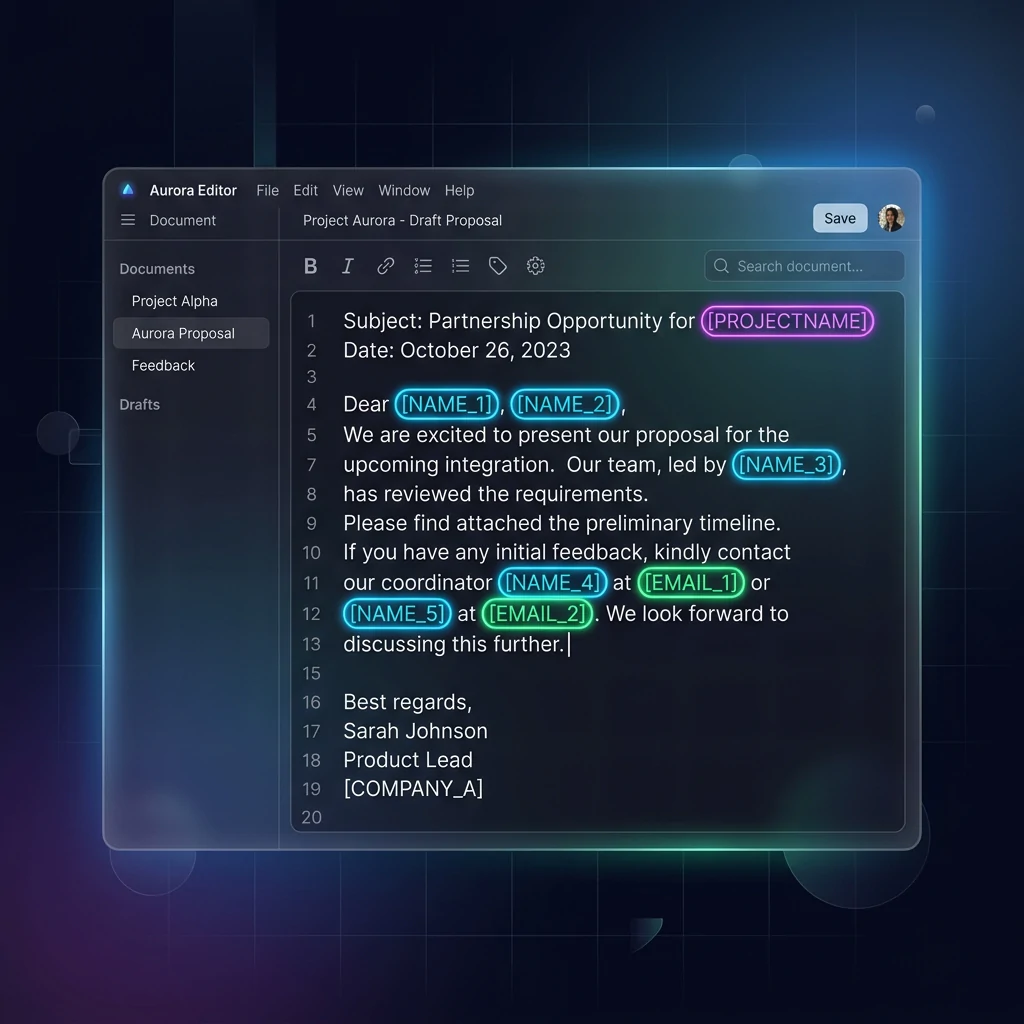
Test real-time client-side RAM tokenization. Choose a specialized preset or paste your own raw prompt to test instant reversible redaction.
Sanitized locally in volatile RAM. Pre-prompt compliance maintained under PII Scanner & Removal Tool standards (GDPR, HIPAA, SOC 2).
The Challenge with AI Data Workflows
Legacy cloud-proxy DLP (Data Loss Prevention) systems and online APIs force you to upload your sensitive data to their servers for inspection. This creates a severe 'Middleman Risk', adds 6-8 weeks of legal BAA/DPA contract reviews, and introduces latency penalties up to 1,500ms for every ChatGPT or Claude prompt.
How It Works
Ingest Content
Paste text or drop documents. The file is held strictly in your browser's volatile RAM and encrypted locally.
Local PII Scanning
The ZTDS™ appliance executes a deterministic multi-layer entity scanner in local browser RAM to extract personal names, emails, financial cards, and credentials with zero external network calls.
Token Isolation
Sensitive values are swapped for structural surrogate tokens, and the mapping resides strictly in volatile tab-isolated RAM that purges automatically when you close the browser tab.
Supported Formats & Limitations
Supported Formats
System Limitations
- Single text strings > 5MB are chunked automatically to prevent UI blocking
- Requires standard Web API support (TextEncoder, crypto.subtle)
- NLP entity extraction runs single-threaded, optimal for documents under 2,000 pages
Outcome Breakdown: Eliminating the 6-Week Legal Bottleneck
When employees copy internal documents, customer support tickets, financial ledgers, or HR records into ChatGPT, Claude, or Gemini, traditional DLP tools block the request or route the raw prompt through an external cloud proxy. That creates a 6-to-8 week security questionnaire bottleneck and introduces an untrusted third-party vendor into your compliance perimeter.
The Zero-Subprocessor Advantage: 0-Day AI Approval
PrivacyScrubber strips personal identifiers locally inside the browser's volatile RAM before the prompt is sent to any AI server. Because zero PII leaves the endpoint, no third-party data processor relationship is formed, eliminating subprocessor risk and procurement bottlenecks for Data Processing Agreements (DPAs) or Business Associate Agreements (BAAs). Your team can use our PII scrubbing tool to start using AI on day 1 with zero compliance debt.
Instant Web Worker tokenization
100% Volatile browser memory
Unlimited seats, zero seat tax
Side-by-Side Comparison: Legacy Cloud Proxy vs. Local Browser Masking
Compare data transit, latency overhead, and vendor risk between cloud middleware and client-side ZTDS.
| Evaluation Factor | Legacy Cloud Proxy DLP | PrivacyScrubber Local PII Engine |
|---|---|---|
| Data Path & Transit | Traverses proxy vendor cloud & third-party inspection APIs | Stays 100% inside local browser RAM (0 Bytes transmitted) |
| Latency Penalty | +200ms to +1,500ms network round-trip overhead | <1ms local Web Worker & WASM execution |
| Legal Procurement | Requires DPA, BAA, and 6-to-8 week vendor security review | Zero Subprocessor — No Data Processor Relationship formed |
| Breach Exposure Risk | $4.88M average enterprise data breach exposure (IBM Cost of Breach) | $0 exfiltration payload risk — Only synthetic tokens hit LLMs |
| Pricing Model | $15–$45 per user per month seat tax (annual contracts) | $99/mo flat for unlimited team seats — No per-user penalty |
Architectural Vulnerabilities: Cloud DSPM & DLP Incumbents
How cloud-based compliance tools create security blind spots and latency bottlenecks for AI users.
| Vendor / Architecture | Core Bottleneck / Vulnerability | Latency & Speed | Data Residency / DPA |
|---|---|---|---|
| Skyflow API Data Privacy Vault | External API dependency (Network hop). Requires sending raw payloads to regional vault clusters. | 150–350ms | Requires BAA/DPA. Data leaves local endpoint. |
| Nightfall AI Cloud DLP API | Cloud proxy bottleneck. Subject to strict API rate limits (HTTP 429) and network volume throttling. | 300–1,200ms | Requires BAA/DPA. Prompts traverse cloud servers. |
| Cyera API-First DSPM | Scan-only visibility gap. Lacks real-time inline intervention for interactive prompt masking. | N/A (Out-of-band) | Cloud IAM access and telemetry ingestion required. |
| Securiti.ai Graph-Based DSPM | Alert fatigue and orchestration complexity. Heavy multi-cloud API connector integration needed. | N/A (Out-of-band) | Deep IAM connector permissions and logs stored externally. |
| PrivacyScrubber Zero-Trust Local Execution | None. 100% Client-side RAM execution. Air-gapped deployment verified. | <1ms (RAM) | 0 Bytes egress. Zero subprocessor risk. |
How Compliance Officers Verify Zero-Trust Execution in 60 Seconds
Security teams should never rely on marketing promises. Run this audit on your own machine in 1 minute:
Open DevTools
Press F12 in Chrome or Edge and navigate to the Network tab.
Activate Offline Mode
Check the Offline box in DevTools or disconnect your operating system Wi-Fi.
Execute PII Scrub
Paste confidential text containing names, SSNs, and credit cards, then click Scrub.
Confirm 0 Packets
The Network log remains completely empty. 0 bytes transmitted, 0 cloud calls.
Two Ways to Deploy Client-Side Sanitization
Choose between zero-install web workspace or seamless browser extension auto-masking.
Secure Web Workspace
Zero-installation web tool designed for ad-hoc sanitization. Paste text or drop documents (.txt, .csv, .docx, .pdf). Sanitizes in volatile tab RAM with instant 1-click token copy and reverse reveal.
- 100% Client-side — No login or account required
- Batch processing for multi-page documents
- Download signed CISO compliance receipts
Chrome & Edge Extension
Inline protection injected directly into ChatGPT, Claude, Gemini, Notion, and Zendesk. Automatically intercepts typing and highlights to mask sensitive entities in-place before pressing Enter.
- Zero tab-switching — Mask in-place with hotkey
Cmd+Shift+P - Live floating cursor shield with instant PII counts
- Automatic token reveal rehydration in 1 click
Specialized Sanitization Capabilities
Explore purpose-built modules designed for high-security enterprise workflows.
Deploy the Zero-Trust Engine Across Your Entire Stack
The exact same deterministic NLP + regex engine powers our Chrome Extension, Developer SDK, and Local MCP Server — guaranteeing 100% token consistency from browser to backend pipelines.
Client-Side ZTDS™ Execution & Conformance Verification
All PII detection and deterministic tokenization execute 100% inside local client memory — eliminating cloud proxies, external subprocessors, and network data egress.
Frequently Asked Questions
Technical Details & Privacy Architecture
How do I remove PII from text online for free?
Why is local browser-based PII removal safer than cloud DLP APIs?
Can this PII removal tool strip names, emails, and financial data simultaneously?
How does PII removal work before sending prompts to ChatGPT, Claude, or Gemini?
How does the engine handle both structured and contextual identifiers?
What is the token format and can I customize it?
How does the engine handle overlapping matches?
What detection accuracy can I expect for names?
Does PII detection work offline?
Does the Chrome extension use the same detection engine?
Protect Your Team's AI Prompts in Under 30 Seconds
No server uploads. No account required. 100% offline in your browser's local RAM.
