Support Teams: Zero-Trust Customer Record Safety
Support & Tickets: Prevent support agents from leaking customer account info and PII to OpenAI. Auto-redact ticketing data natively inside ChatGPT.

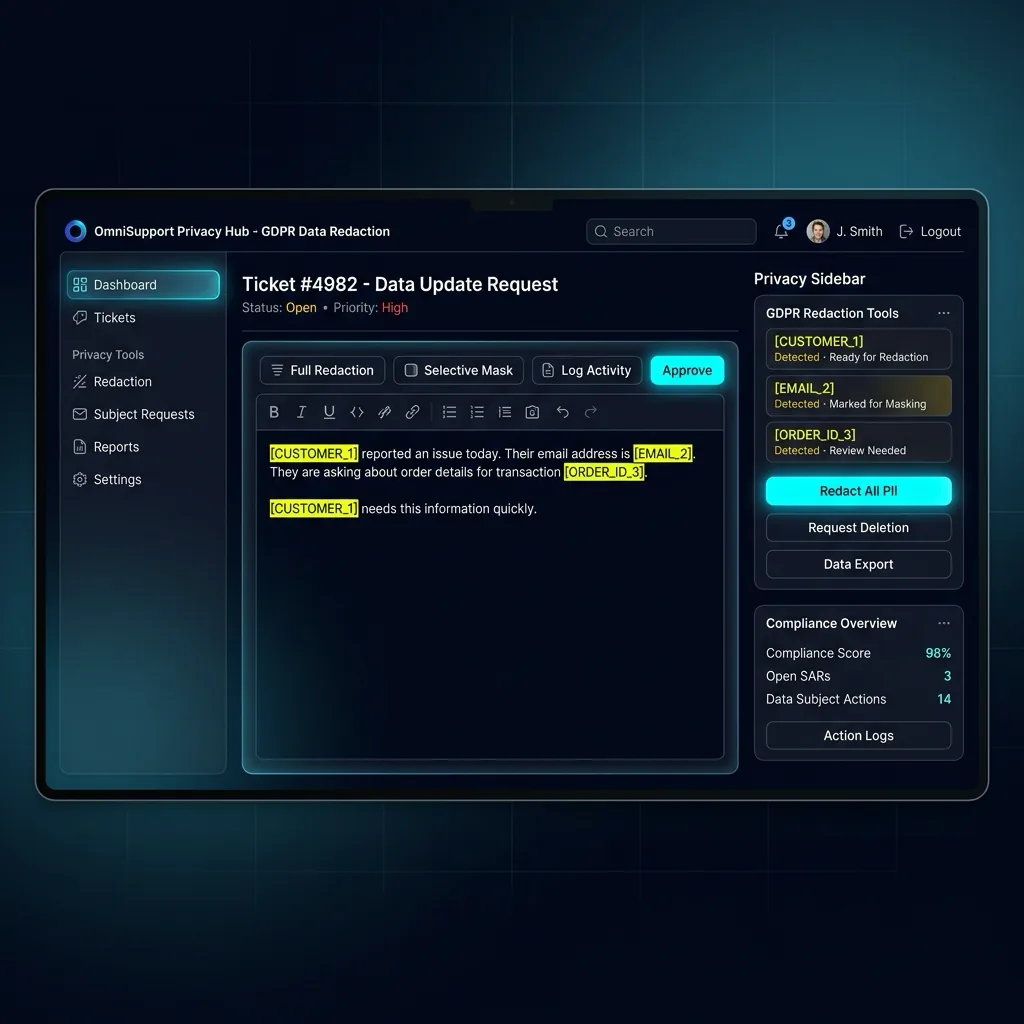
"Prevent support agents from leaking customer account info and PII to OpenAI. Auto-redact ticketing data natively inside ChatGPT."
Custom Rules for Support Teams
Unlock unlimited Support AI Privacy custom regex patterns and local PDF scanning with PRO.
Customer support teams process hundreds of Zendesk, Intercom, and Freshdesk tickets daily, containing customer authentication tokens, phone numbers, billing addresses, and raw error logs. PrivacyScrubber's Support Extension automatically scrubs customer PII before agents feed logs into AI troubleshooting tools.
Helpdesk Log & Customer Account Sanitization
Scans customer IDs, billing references, session cookies, auth headers, and IP addresses in helpdesk tickets in <2ms browser RAM.
Native Helpdesk DLP for Fast Escalations
When tier-2 support agents escalate complex technical issues to ChatGPT for root-cause analysis, they often inadvertently paste raw user sessions and customer billing references. PrivacyScrubber's sandboxed browser extension intercepts ticket pastes, converting customer names into [USER_1] and auth tokens into [AUTH_TOKEN_1], allowing agents to use AI troubleshooting without leaking customer secrets.
Zendesk Customer Issue Troubleshooting
- 11. Ingest Raw Support & Tickets Payload: Agent copies customer complaint containing customer email, phone number, and billing error trace.
- 22. Tokenize Support AI Privacy in Browser RAM: The extension detects 4 sensitive customer entities, replacing them with structured tokens in the prompt box.
- 33. Run AI on Anonymized Support & Tickets Logic: Agent prompts ChatGPT: "Diagnose billing gateway error for [USER_1] with session [AUTH_TOKEN_1]". AI provides step-by-step fix.
- 44. Restore Support & Tickets Values Locally: Agent restores real customer details via 1-click in-page reveal and pastes the solution directly into the Zendesk ticket.
Customer Data Shielding under SOC 2 & PCI DSS
Customer support tickets are high-risk vectors for PCI DSS and SOC 2 violations when payment tokens or PII are exposed. Local browser tokenization eliminates the risk of cloud ticket exfiltration, following guidelines in our AI Privacy Guides hub.
Multi-Line Error Log Reconstruction & OCR Extraction
Support logs frequently split customer identifiers across multiline stack traces. Our in-memory pre-processor reconstructs fragmented records before tokenization, while offline WASM OCR extracts error text from user screenshot attachments without network calls, as detailed in PII protection basics and Zero-Trust AI frameworks.
Audit-Ready Support Infrastructure
Generate cryptographic audit receipts proving that customer support escalation prompts contained zero plaintext PII, aligning with GDPR/CCPA standards compliance standards.
Fleet MDM Deployment & Offline PDF Guard (Support & Tickets)
IT administrators roll out the Support & Tickets browser profile across Google Chrome Enterprise and Microsoft Edge via managed policy JSON. Employees redact Zendesk PII Masking Workspace, DOCX files, and pasted images 100% offline with verifiable SHA-256 audit receipts.
Related Support & Tickets & Vertical Browser Guides
All 20 Extension Guides →Deploy Zero-Egress Protection for Customer Support AI Privacy
Replace names, emails, and regulated IDs with reversible tokens inside ChatGPT, Claude, and Gemini — deploy flat-rate governance across your workforce for $99/mo (TEAMS, unlimited seats), or integrate headless Node.js/WASM pipelines with Developer SDK ($299/mo).
Local RAM Proof for Support Teams
Deterministic rules protect Support Teams workflows (Zendesk PII Masking Workspace) entirely inside local RAM dictionaries—never touching vendor storage.
Client Boundary Advisory (Support Teams): tokenize Support AI Privacy entries with https://privacyscrubber.com/?profile=support#ai or privacyscrubber.com/?verify=zero-egress#ai so cleartext remains strictly inside user hardware.
Frequently Asked Questions
Common questions about deploying zero-trust AI for Support & Tickets Teams.