In-Page PII Masking Popover: Highlight Any Text to Scan & Mask Sensitive Data for Any LLM
Highlight Text Anywhere in Your Browser — Instantly Scan for PII and Mask Sensitive Data In-Place Before Sending to Any LLM
AI Summary / Key Takeaways
"Highlight any text on any webpage or input field to instantly scan for sensitive data and mask PII in-place. The PrivacyScrubber in-page popover analyzes your browser selection in local RAM, shows detected PII counts, and swaps names, emails, API keys, and credentials into tokens in under 2ms — allowing you to work safely with any LLM without leaving your active tab."
Enterprise-Grade AI Privacy
Add custom redaction rules and priority support with PRO.
Interactive PII Detection & Sanitization Sandbox
Test real-time client-side RAM tokenization. Choose a specialized preset or paste your own raw prompt to test instant reversible redaction.
Sanitized locally in volatile RAM. Pre-prompt compliance maintained under In-Page PII Selection Popover standards (GDPR, HIPAA, SOC 2).
The Challenge with AI Data Workflows
When researching, drafting, or interacting with AI models, copying snippets into external sanitizers breaks your flow. Without real-time scanning, you can't be sure if a highlighted customer email, error log, or contract excerpt contains hidden API keys or phone numbers. PrivacyScrubber's popover scans highlighted browser text on the fly and tokenizes it in-place in 1 click, making any web text safe for ChatGPT, Claude, Gemini, DeepSeek, or internal LLMs without tab switching.
How It Works
Highlight Any Text in Your Browser
Select text on any webpage, email, ticket, or inside your AI prompt box. The extension instantly scans the selected string in local RAM for sensitive entities.
Instant PII Scan & Shield Badge
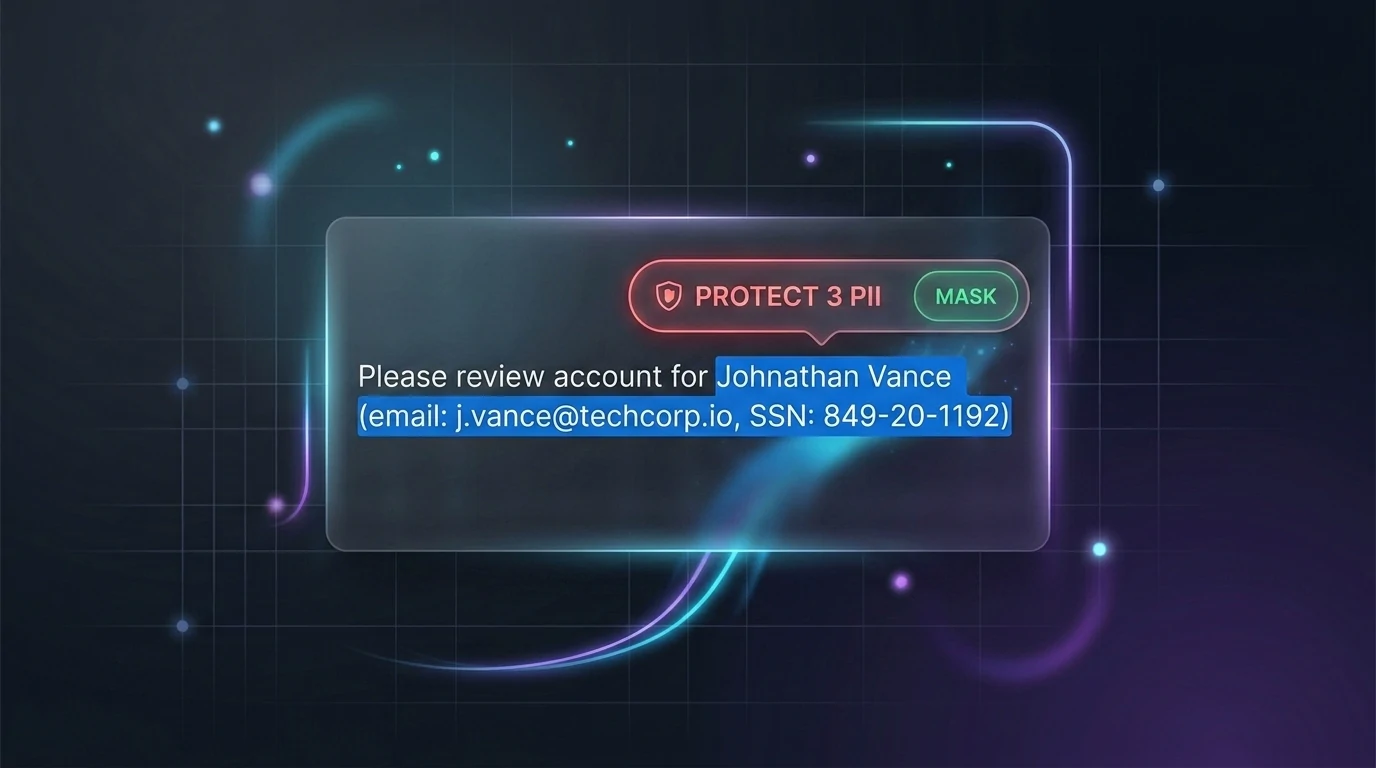
A floating shield badge appears next to your cursor displaying the exact count of detected sensitive items (e.g. 'PROTECT 3 PII').
1-Click / Shortcut In-Place Masking
Click the shield or press Cmd+Shift+P (Mac) / Alt+Shift+P (Windows). Names, emails, phone numbers, and keys are instantly replaced with tokens ([NAME_1], [EMAIL_1]) right inside your input box.
Submit Safely to ANY LLM
Send your sanitized prompt to ChatGPT, Claude, Gemini, Perplexity, DeepSeek, or any AI tool. When the model replies, click the green popover button to reveal original data locally.
What Teams Achieve with Local PII Masking
Swipe to read verified reviews
Supported Formats & Limitations
Supported Formats
System Limitations
- Requires PrivacyScrubber Chrome Extension installed
- Processes up to 15,000 characters per selection on Free tier (unlimited on PRO/Teams)
The Core Mechanism: Highlight, Scan & Mask In-Place
Never copy-paste confidential data to external sanitizer tabs. PrivacyScrubber's in-page popover operates at the browser DOM selection layer, analyzing text in volatile memory and swapping identifiers for structured tokens directly inside your active input.
Select Any Text
Highlight snippets on web pages, email drafts, CRM tickets, or prompt boxes.
Live PII Badge
The core engine parses entities in RAM and renders the count near your cursor.
1-Click / Hotkey Tokenization
Click shield or press Cmd+Shift+P. Text swaps to tokens and preserves React state.
Why External Sanitizers Fail Knowledge Workers
Traditional PII tools force employees to switch tabs, paste text into external web apps, copy masked tokens, paste back into ChatGPT, and repeat for every query.
- 25–45s Friction: Wasted per prompt on repetitive copy-paste context switching.
- 92% Employee Bypass: Teams skip external sanitizers when deadlines press, leaking raw data.
- Blind Pasting: No real-time indication whether a highlighted snippet contains confidential keys or SSNs.
Instant, In-Place Browser Protection
PrivacyScrubber brings the zero-trust sanitization engine directly to your active browser cursor, eliminating tab switching entirely.
- 0 Tab Switches: Highlight, inspect the PII count badge, and mask in 1 click or shortcut.
- Zero-Trust Guarantee: 100% local RAM execution — 0 bytes ever leave your device.
- 1-Click Reverse Reveal: Restore original names locally when ChatGPT or Claude replies.
Works with 100% of LLMs, Support Queues & Web Apps
Operating at the browser DOM selection layer ensures universal coverage without APIs or proxies.
GenAI Models & Chatbots
Highlight draft prompts in OpenAI ChatGPT (GPT-4o/o1/o3), Anthropic Claude, Google Gemini, Perplexity, DeepSeek, Mistral, and Microsoft Copilot. Mask in-place before pressing Enter.
Customer Support & CRM
Highlight incoming tickets containing customer phone numbers, physical addresses, or account credentials. Mask in-place before asking AI to draft replies in Zendesk, Intercom, or Salesforce.
Docs, Logs & Custom Portals
Works natively on Google Docs, Notion, GitHub / Sentry error stack traces, internal corporate AI portals (LibreChat, Open WebUI), and browser-based PDF documents.
Three Ways to Trigger In-Page Selection Masking
Choose the trigger that fits your typing style, posture, and active application.
1. Floating Cursor Shield
Highlight text with your mouse. A glowing shield badge appears near your cursor displaying PROTECT N PII. Click once to mask; click a second time to open the Reveal viewer.
2. Keyboard Power Shortcut
Designed for developers and touch-typists. Select text with Shift+Arrows and press Cmd+Shift+P (Mac) or Alt+Shift+P (Win/Linux) to mask in under 2ms without touching your mouse.
3. Right-Click Context Menu
Highlight text anywhere, right-click, and select 'Scrub PII (PrivacyScrubber)'. Perfect for static web pages, browser PDF viewers, email clients, and complex multi-layered web apps.
In-Page Selection Popover vs. Traditional Approaches
| Workflow Metric | PrivacyScrubber Popover | Manual Tab Sanitizers | Cloud DLP Proxies |
|---|---|---|---|
| Highlight & Scan Feedback | Instant "PROTECT N PII" badge | None (Must paste into tab) | Silent proxy inspection |
| User Action Required | 1 Click / 1 Hotkey | 8 manual copy-paste steps | Automatic (Proxy setup required) |
| Execution Latency | < 2 ms (Local RAM) | 25–45s human delay | 600–2,000ms proxy network lag |
| Universal LLM Support | 100% (ChatGPT, Claude, any) | Manual paste into any | Limited to configured routes |
| Third-Party Network Exposure | 0 Bytes leave machine | Exposed to external web app | Transmitted to cloud proxy |
| Airplane Mode / Offline | 100% Fully Functional | Fails (Requires internet) | Fails (Requires proxy tunnel) |
Virtual DOM & Input Integrity Engine
Replacing text via standard DOM mutations breaks reactive state in ChatGPT, Claude, and Notion. PrivacyScrubber uses an engineered event dispatch pipeline:
- Native Range Mutation: Employs
setRangeText()anddocument.execCommand('insertText')to preserve cursor focus. - Synthetic Event Dispatch: Triggers synthetic
InputEventandChangeEvent, instantly updating React/Vue virtual DOM and enabling the Send button. - Volatile RAM Vault: Stores token mappings strictly in tab-isolated ephemeral RAM for 1-click reverse reveal.
30-Second DevTools Security Audit
Security teams and compliance officers can verify our zero-network architecture in 30 seconds:
- Open ChatGPT, Claude, or any web input in Google Chrome.
- Press F12 to open DevTools and select the Network tab.
- Set the filter to Fetch/XHR.
- Highlight text containing mock SSNs, emails, or names.
- Click the floating red shield or press Cmd+Shift+P to mask.
- Verify: 0 outbound network requests. 100% of processing occurs in local RAM.
Client-Side Reliability & Audit Verification
Powered by the Zero-Trust Sanitization Engine (ZTDS). All detection, tokenization, and regex evaluation execute 100% inside your local client process boundary — eliminating cloud proxies, intermediate servers, and third-party data retention risks.
Step-by-Step Guide
How to use this feature
Select text to scan for PII
Highlight customer logs, email snippets, or prompt drafts anywhere on your screen.
Inspect the detected PII count
Check the floating badge near your cursor, which automatically shows the number of sensitive entities detected.
Mask in-place with 1 click or shortcut
Click the floating badge or press Cmd+Shift+P / Alt+Shift+P to swap sensitive data into structured tokens without leaving the page.
Query any LLM with zero data leak risk
Submit the tokenized text to your preferred AI model. The AI never sees your confidential information.
Frequently Asked Questions
Technical Details & Privacy Architecture
How does the in-page popover scan highlighted text for PII?
Does the in-page popover work with ANY LLM and AI chatbot?
Does in-place masking break ChatGPT's Send button or React/Vue input state?
Can I use keyboard shortcuts to scan and mask text without using the mouse?
How does the right-click context menu compare to the floating popover?
How do I restore original names and values when the AI replies with tokens?
Is my highlighted text or prompt ever sent to external servers?
What happens if I highlight text that is already masked with tokens like [NAME_1]?
Does the popover support custom corporate regex rules and industry profiles?
Can I disable or customize the floating shield on specific websites?
Protect Your Team's AI Prompts in Under 30 Seconds
No server uploads. No account required. 100% offline in your browser's local RAM.
